PC Deployment with SCCM and MDT

Latest News

  • USMTGUI migrates user profiles to Azure AAD
  • SCCM – Installing intrusive Applications…
  • Remove keyboard layout from Windows 10
  • WSUS fail – Reset defunct WSUS
  • network connection check with Powershell
  • Home
  • SCCM Pages
  • Videos
  • Self-study Guides
  • All Posts
  • Tips & tricks
  • About US

PXE boot menu Forwarder – Windows and Linux

Sep 19, 2014 Thomas Ehler Uncategorized 0


Having multible Linux Install servers and a Windows MDT or SCCM on the same network?

It can be done, and quite simple too.
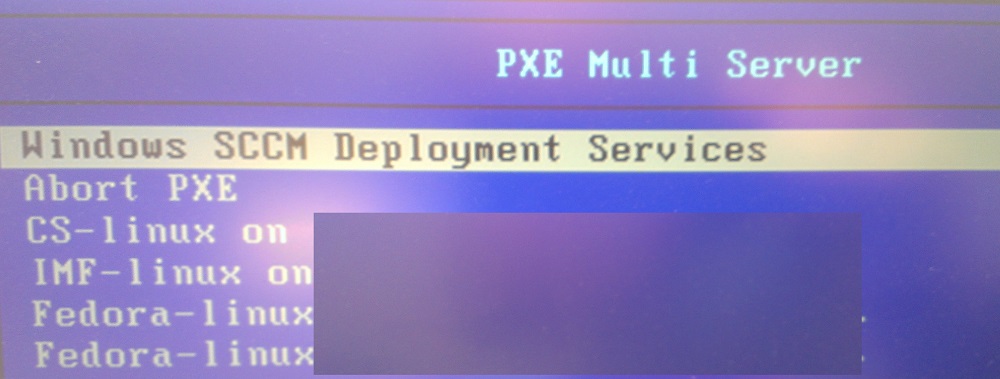
MultiPXE


1. Setup a small virtual server with server 2008/2012 and install the WDS service.
2. Configure the WDS service and create the RemoteInstall share e.g., D:\RemoteInstall.
(do not add any boot images etc.)
3. Open Windows Deployment Services and expand the “Servers” branch. Right click your WDS and select Properties. Now edit as shown here:

WDS

4. Download sysLinux 3.86 and extract the files:

  • “\core\pxelinux.0,
  • “\modules\pxechain.com” and
  • “\com32\menu\menu.c32”

directly to D:\RemoteInstall\Boot\x64\

Now Create a directory in D:\RemoteInstall\Boot\x64\ named “pxelinux.cfg”
Create a new text file: x64\pxelinux.cfg\default (without extension!) with the following content as a guide:
————————————————————-
LABEL SCCM
MENU DEFAULT
MENU LABEL Windows SCCM Deployment Services
KERNEL pxechain.com
APPEND 192.168.2.200::SMSBoot\x86\wdsnbp.com
#IP address above is SCCM PXE host

LABEL abort
MENU LABEL Abort PXE
Kernel    abortpxe.0

LABEL linux1
MENU LABEL Linux1 on linuxserver1…
KERNEL pxechain.com
APPEND 192.168.2.201::pxelinux.0
#IP address above is Linux PXE host

LABEL linux2
MENU LABEL Linux2 on linuxserver2…
KERNEL pxechain.com
APPEND 192.168.2.202::pxelinux.0
#IP address above is Linux PXE host
————————————————————-
(Insert correct IP-Addresses and boot files corresponding to your environment!)

Now run the following commands from an elevated Command promt:
wdsutil /set-server /bootprogram:boot\x64\pxelinux.0 /architecture:x64
wdsutil /set-server /N12bootprogram:boot\x64\pxelinux.0 /architecture:x64

Last step is to have your Network PXE set to point to the new WDS!


Office 2010/2013. How to Include all Updates SCCM 2012 Task sequence breaks prematurely

Thomas Ehler

Related articles
  • USMTGUI migrates user profiles to Azure AAD
    USMTGUI migrates user profiles to Azure...

    Jun 11, 2020 0

  • SCCM – Installing intrusive Applications…
    SCCM – Installing intrusive...

    May 29, 2019 0

  • Remove keyboard layout from Windows 10
    Remove keyboard layout from Windows 10

    Apr 09, 2019 0

  • WSUS fail – Reset defunct WSUS
    WSUS fail – Reset defunct WSUS

    Aug 09, 2018 0

More in this category
  • USMTGUI migrates user profiles to Azure AAD
    USMTGUI migrates user profiles to Azure...

    Jun 11, 2020 0

  • SCCM – Installing intrusive Applications…
    SCCM – Installing intrusive...

    May 29, 2019 0

  • Remove keyboard layout from Windows 10
    Remove keyboard layout from Windows 10

    Apr 09, 2019 0

  • WSUS fail – Reset defunct WSUS
    WSUS fail – Reset defunct WSUS

    Aug 09, 2018 0


Leave a Reply Cancel reply

Your email address will not be published. Required fields are marked *

Recent Posts

  • USMTGUI migrates user profiles to Azure AAD
  • SCCM – Installing intrusive Applications…
  • Remove keyboard layout from Windows 10
  • WSUS fail – Reset defunct WSUS
  • network connection check with Powershell
  • SCCM State Migration Point Creation
  • USMT XML files improved and updated for USMT 10 and Windows 10
  • USMT migration of Edge favourites and Sticky Notes
  • SCCM Task Sequence Reinstall User warning.
  • ConfigMgr-SQL-recommendations.xlsx

Recent Videos

  • Building the Perfect Windows 8.1 Image

    Building the Perfect Windows 8.1 Image

    Mar 13, 2014
  • Master ConfigMgr 2012 R2 with a Limited Budget

    Master ConfigMgr 2012 R2 with a Limited Budget

    Mar 13, 2014
  • #3 SCCM2012 Application Management Part 1

    #3 SCCM2012 Application Management Part 1

    Mar 10, 2014
  • #2 SCCM 2012 Infrastructure Technical Overview

    #2 SCCM 2012 Infrastructure Technical Overview

    Mar 10, 2014
  • #1 SCCM 2012 Technical Overview

    #1 SCCM 2012 Technical Overview

    Mar 10, 2014

Recent comments

  • User State Migration Tool (USMT) Troubleshooting - EhlerTech on USMT – User State Migration Tool Errors
  • Mark H on Upgrade to Windows 10 with SCCM
  • SCCM Deploy – SCCM 2012 Comprehensive guides by Prajwal Desai on Post 1. Setting up VMware AD and SCCM 1511
  • SCCM Deploy – Post 1. Setting up VMware AD and SCCM 1511 on Post 4. Setup SCCM 2012 1511
  • SCCM Deploy – Post 3. DC – Setup DHCP and if needed KMS on Post 4. Setup SCCM 2012 1511
Copyright 2014 / All rights reserved